Employee time tracking
Employee time tracking software, from clock-in to payroll file
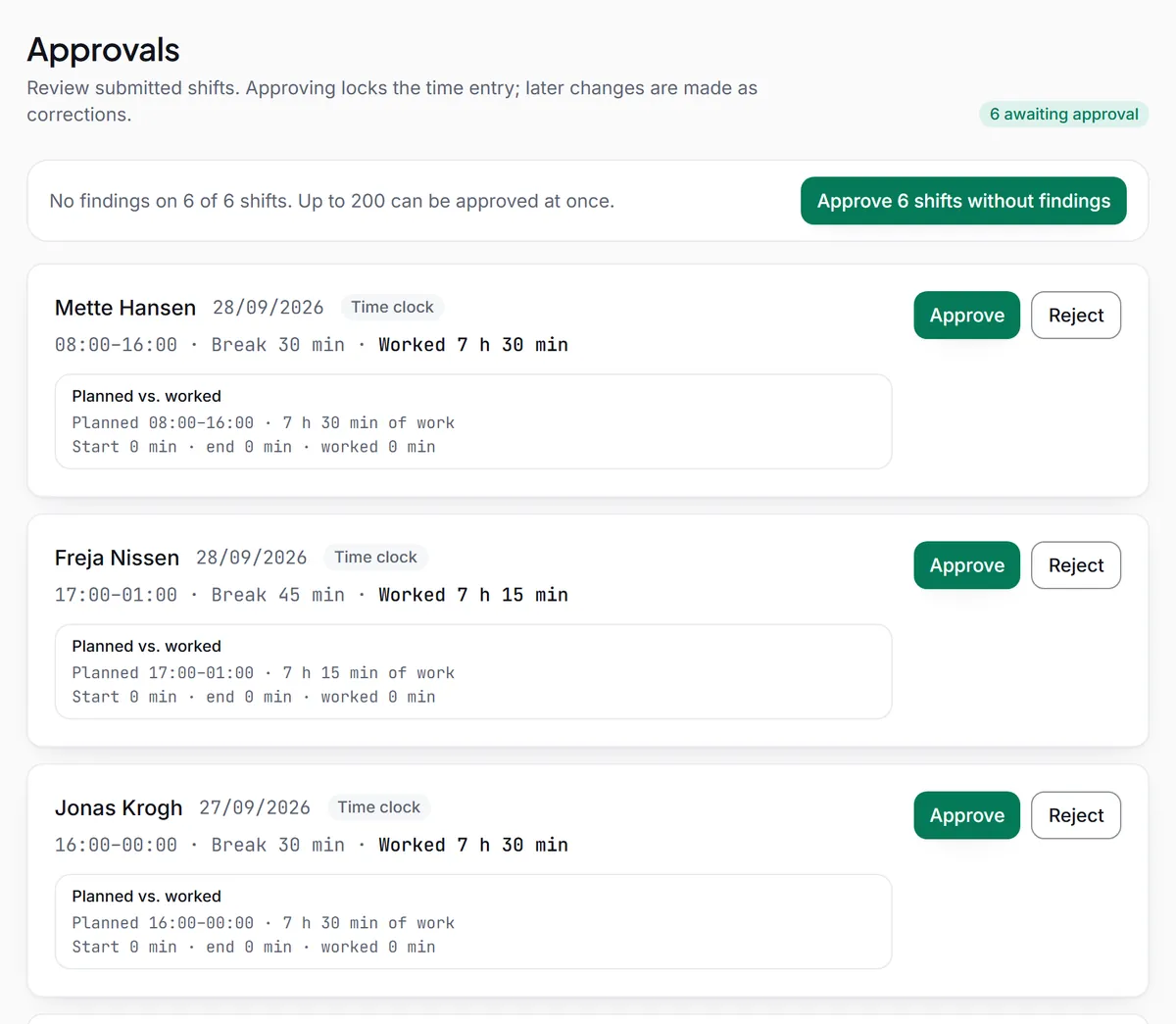
Regsta is employee time tracking software for teams that work in shifts. Employees clock in, take breaks and clock out in the browser or the Android app. Managers approve or reject each shift with a reason, close the pay period and download approved hours as a payroll file, CSV or Excel. Regsta records times, not locations.
Who does what
Each person's role decides what they see and what they can change.
Employees
Clock in, start and end breaks and clock out on their own phone or computer. They see the day under Today, the week under Week and the status of each shift: Awaiting approval, Approved or Rejected.
Admins and Planners
Planners build and publish the shift schedule and correct time entries. Admins also approve hours, invite people, set the working-time rules and close pay periods.
Payroll
Payroll users approve hours, close pay periods and create the payroll file. Admins and Payroll users are the roles that see hourly rates.
Auditors
Auditors have read-only access, including the audit trail and the Inspection folder.
What gets recorded
Every shift is a small, plain record, and nothing in it is overwritten.
Start, end and break
Each shift keeps its start, end and break. Hours worked are the time from start to end, minus the break.
Where an entry came from
Each entry is labelled Time clock, Manual entry, Correction or Added by admin.
Every version
A correction is saved as a new version with a reason. The original stays, locked, and both appear in the audit trail.
An audit trail
Clock events, corrections, approvals and exports go to an audit trail that the database does not let anyone change or delete during the retention period.
What Regsta does not do
Worth knowing before you choose any time tracking tool.
No location, no photos
No GPS, no geofence and no photo at clock-in. Regsta records the time a person taps, not where they are.
No shared time clock
Each employee clocks in on their own account. Nobody clocks in for someone else.
No payroll connection
Regsta writes a file and your payroll system imports it. Nothing is sent to the payroll system, and no overtime or supplements are added.
No holiday balances
Employees request time off in whole days. Regsta keeps no holiday balances and has no sickness type.
iPhone app not yet published
On an iPhone, employees use Regsta in the browser. The Android app is on Google Play.
Five questions to ask any time tracking tool
Each one is answered here for Regsta.
Is the original kept when someone corrects an entry?
Yes. The original is kept and locked, and the correction is a new version with a reason.
Can hours change after payroll has them?
Not in a closed pay period. It refuses new shifts, clock events and corrections until someone reopens it with a reason.
Does the clock work without signal?
Once the Time clock is open, yes: taps are kept with the time they were made and sent in order later. Signing in needs a connection.
Can a manager see who is working now?
Yes. Today lists who is clocked in and who is on a break.
Who can see pay data?
Admins and Payroll users. Other roles do not see stored hourly rates.
Questions about employee time tracking
- What is employee time tracking software?
- It records when each employee starts, takes a break and finishes work, then turns those records into approved hours for payroll. In Regsta, employees tap Clock in, Start break, End break and Clock out, a manager approves the shift, and approved hours export as a pay summary, CSV or Excel.
- Does it work for shift teams?
- Yes. Regsta also builds the shift schedule: managers publish the week, employees see their own shifts, and the hours worked can be compared with the plan when a manager approves them.
- Does Regsta track where employees are?
- No. There is no GPS, no geofence and no photo at clock-in. Regsta records the time a person taps, and each employee clocks in on their own account.
- Can managers change an employee's hours?
- A manager can correct a time entry or add one for an employee. A reason is required, the original is kept and the correction goes for approval, so the change is visible in the audit trail.
- Does Regsta connect to our payroll system?
- No. Regsta creates a file of approved hours that you import into your payroll system. It sends nothing to the payroll system and adds no overtime or supplements.
Try it with your own team
Create your company, invite your employees and approve your first week of hours.