On the phone
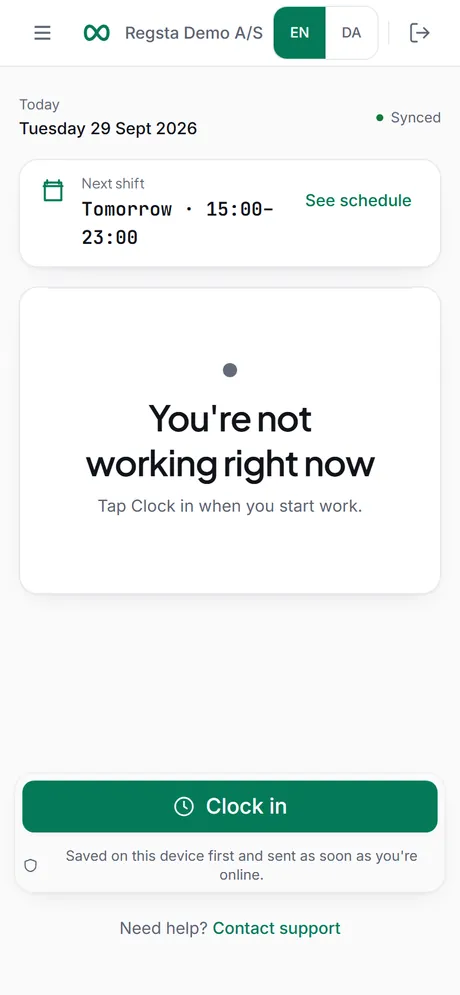
Your employees use Regsta in the browser on their own phone, with nothing to install.
They sign in from the invitation you send, and they get the time clock, their hours, their schedule and your announcements in one place.
Create your free account
No card required.
What employees can do
The same account works on a phone and on a computer.
Their time
- Clock in, take breaks and clock out
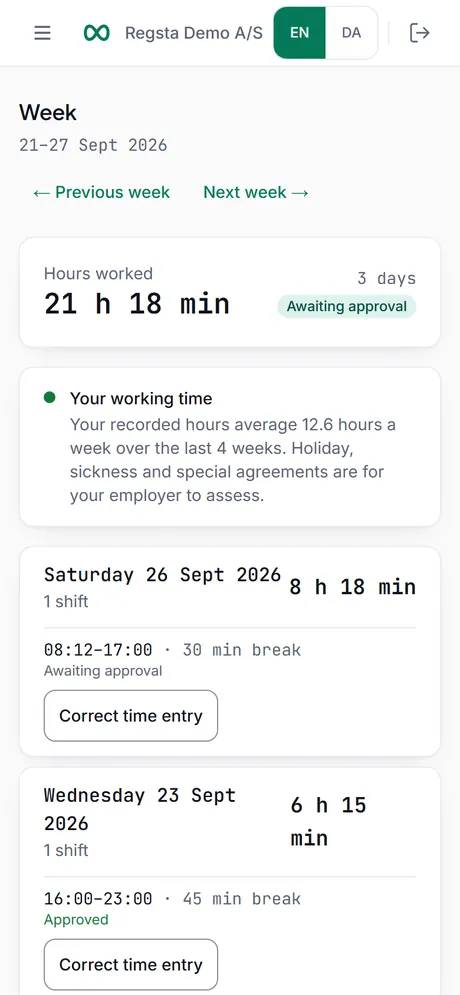
- See the week's hours and the status of each shift
- Ask for a correction, with a reason
Their schedule
- See upcoming shifts, mark them as seen and download them as a calendar file
- Request time off: Holiday, Personal or Other
- Say when they cannot work or would like to work
- Ask for cover, or request an open shift
Their messages
- Read announcements from the company
- See decisions on their time off, corrections and cover requests under Updates
What about an app?
We have built apps for iPhone and Android. They are not yet published in the app stores, and we do not promise a date. Until they are, employees use Regsta in the browser on their phone, and everything on this page works there.
What Regsta does not do on the phone
- It does not track location. There is no GPS and no record of where someone clocks in.
- It does not take photos at clock-in.
- Without signal, only clock in, breaks and clock out are saved, and they stay in the browser they were made in until they are sent. Everything else needs a connection.
Invite your team
Create your company and send the invitations. Employees open the link on their phone and sign in.